Comments
41 comments
-
 Official comment
Thank you for your patience while we investigated this.
I'm pleased to let you know that we’ve released a new version of SQL Prompt that includes a fix for this issue. You can now update to the latest version of SSMS, and it will be fully compatible with this new SQL Prompt release:
https://download.red-gate.com/checkforupdates/SQLPrompt/SQLPrompt_11.3.8.22342.exe
-

just upgraded and got this error when opening newest version of SSMS 22.4.1
Method not found: 'Microsoft.Extensions.DependencyInjection.IHttpClientBuilder Microsoft.Extensions.DependencyInjection.HttpClientFactoryServiceCollectionExtensions.AddHttpClient(Microsoft.Extensions.DependencyInjection.IServiceCollection, System.String, System.Action`1<System.Net.Http.HttpClient>)'.
-

Same problem for me. Installed SSMS 22.4.1 and get this error and no SQL Prompt functionality; unusable. Tried re-installing latest SQL Prompt - same problem. Rolled back to SSMS 22.3.3 and working again.
Error activating IHttpClientFactory
No matching bindings are available, and the type is not self-bindable.
Activation path:
7) Injection of dependency IHttpClientFactory into parameter httpClientFactory of constructor of type QtpApiFetcher
6) Injection of dependency IQtpApiFetcher into parameter qtpApiFetcher of constructor of type IndexAnalyzer
5) Injection of dependency IIndexAnalyzer into parameter indexAnalyzer of constructor of type IndexAnalysisResultViewModelFactory
4) Injection of dependency IIndexAnalysisResultViewModelFactory into parameter indexAnalysisResultViewModelFactory of constructor of type QtpIndexesController
3) Injection of dependency IQtpIndexesController into parameter qtpIndexesController of constructor of type IndexAnalysisCommandController
2) Injection of dependency IIndexAnalysisCommandController into parameter indexAnalysisCommandController of constructor of type ShowIndexAnalysisAiCommand
1) Request for ShowIndexAnalysisAiCommandSuggestions:
1) Ensure that you have defined a binding for IHttpClientFactory.
2) If the binding was defined in a module, ensure that the module has been loaded into the kernel.
3) Ensure you have not accidentally created more than one kernel.
4) If you are using constructor arguments, ensure that the parameter name matches the constructors parameter name.
5) If you are using automatic module loading, ensure the search path and filters are correct.
-

I get the same error.
SQL Prompt is working on older versions of SSMS.
Reporting the error and submitting tickets does not get a response from Red-Gate. Please tell me how you get a response from Red-Gate support?
-

Same problem here with SSMS 22.4.1.
-

I ran into the same error as well—best to give the Redgate team some time to investigate. I’m confident they’ll release an updated version soon.
That said, it would be really helpful if Redgate could proactively let users know to avoid the latest Microsoft update if they’re already aware of potential issues.
-

I just upgraded, same issue. When will I ever learn to never upgrade SSMS before scouring the forums for canary in the coal mine issues first.
-

Same problem. Haven't been able to use recent versions of SQL Prompt in Visual Studio 2026 as well.
-

Same. A few event log entries might be a clue:
Product: SQL Doc 5 -- The installer has encountered an unexpected error installing this package. This may indicate a problem with this package. The error code is 2721. The arguments are: CHECK_COMPATIBILITY_SSMS22_3, ,
-

Ran into the same issue myself. This is Claude's analysis of the issue from the exception log file I fed it:
What's actually failingThe DI container (Ninject) is trying to wire up
ShowIndexAnalysisAiCommand— which is SQL Prompt's AI-powered index analysis feature — and the injection chain is:ShowIndexAnalysisAiCommand → IndexAnalysisCommandController → QtpIndexesController → IndexAnalysisResultViewModelFactory → IndexAnalyzer → QtpApiFetcher → IHttpClientFactory ← MISSING BINDINGIHttpClientFactoryis a standard .NET Core type (fromMicrosoft.Extensions.Http) used to createHttpClientinstances. Ninject can't find a binding for it, meaning whoever was responsible for registering it in the DI kernel didn't do so — most likely because SSMS 22.4.1 changed something about how it exposes or provides that factory, and SQL Prompt's bootstrapping code is now looking in the wrong place or expecting it to already be registered by the host.Key observations from the log
- SQL Prompt version is 11.3.7 — so it's the current release, not an old one left behind
- SSMS version detected is 22.4.11612.150 — the fresh update
- Your locale is
en-AU/en-US— irrelevant but good to know it logged it - The error fires during
InitializeAsync→InitializeCommands— i.e., at startup, before SQL Prompt is even usable - Importantly, the licence check at the bottom succeeds — so SQL Prompt partially loads, it just can't build its command menu
What this means practically
The feature that's broken is the newer AI/index analysis functionality (
QtpApiFetchersuggests it's calling out to a Redgate API endpoint). It's possible that:- SSMS 22.4.1 changed how
IHttpClientFactoryis registered in its own DI container, and SQL Prompt was piggybacking on that registration - Or Redgate introduced this AI feature in 11.3.7 and didn't properly register
IHttpClientFactoryin their Ninject kernel for the SSMS 22 entry point specifically
Either way, this is squarely a Redgate bug to fix — there's nothing you can do on your end to resolve it short of waiting for 11.3.8.
What to report to Redgate
When you log the support ticket/forum post, the salient details are:
- SQL Prompt 11.3.7 + SSMS 22.4.11612.150
-
Ninject.ActivationExceptiononIHttpClientFactoryduringInitializeCommands - The failing feature is
ShowIndexAnalysisAiCommand/QtpApiFetcher
-

I’m having the same issue. Do you have any information on when we can expect a fix?
-

I’m having the same issue…
-

I’m having the same issue. A quick fix would be appreciated.
-

I'm having the same issue, and is affecting the whole team. Any action would be appreciated
-

same here!
-

Same problem here. Had to rollback to SSMS 22.3.3 to get SQL Prompt working again
-

I have this pattern. :(
-

… and also here … Come on, Redgate …
-

Henrik Not working for me with 11.3.4
-
I'm pleased to let you know that we’ve released a new version of SQL Prompt that includes a fix for this issue. You can now update to the latest version of SSMS, and it will be fully compatible with this new SQL Prompt release:
https://download.red-gate.com/checkforupdates/SQLPrompt/SQLPrompt_11.3.8.22342.exe
-

Thank you for the quick fix, Vic!
I confirm that SQL Prompt 11.3.8 is working fine with SSMS 22.4.1.
-
It's working! Thanks!
-
Thanks for the quick reaction.
Is that fix only for SQL Prompt or the whole Toolbelt? And if so, does the latest Toolbelt download already include this fix?
-

So what is the sequence that should be followed for this fix?
Install the new SQL Prompt first and then upgrade SSMS to 22.4.1
or
Upgrade SSMS to 22.4.1 first and then update SQL Prompt.
Hopefully there's no requirement to uninstall anything first. That's creaky….
-

The new version is working - tnx a lot!!
Microsoft need a good ol' whoppin'!! - I can bring a rod.
https://download.red-gate.com/checkforupdates/SQLPrompt/SQLPrompt_11.3.8.22342.exe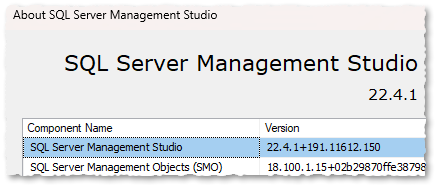
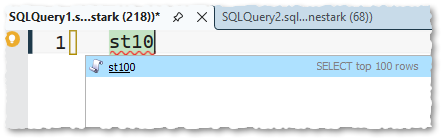
-

I confirm new release 11.3.8 works both in SSMS (last version) as well as VS2026 (last version). Also in VS2026 I got the same issue, now fixed.
-

I ran into the same issue after upgrading SSMS to 22.4.1. Uninstalling and reinstalling SQL Prompt didn’t fix it, and the only solution was to open the Visual Studio Installer, click More, and roll back to the previous version. SSMS 22.3.2 works fine with SQL Prompt.
-
Working for me. I roll back to previous ssms version, then updated sql prompt and updated ssms again. All works. Thanks!
-

Vic Can you add the link to v11.3.8 to your “Official Comment”, or pin it to the top or something?
Thanks for the quick fix -
Works on my machine :-<. I just plopped 11.3.8.22342 right on top of the ailing SSMS and it was healed. No configuration or rollback dances for me.
Add comment
Please sign in to leave a comment.
After upgrading to SSMS 22.4.1, SQL Failed to work. Getting error message when opening SSMS. SQL prompt menu is available but zero functionality.