Comments
77 comments
-

@Christian, I don't have that option.
I only see: <Modify>, <Launch> and <More>.
Under <More>, I only have the options: Repait, Uninstall, Import and export configuration and Update Settings. -

If you did a new install directly to 22.3, you probably don't have a rollback option. If you updated from version 22.2, then the option to “Rollback to previous version” should be under the “More” button on the Visual Studio Installer screen.
-

SQL Search isn't causing the crash (alone). I just uninstalled SQL Search 3.9.4, leaving SQL Prompt 11.3.5 installed, but SSMS 22.3 still crashes while connecting to a SQL Server instance.
Also waiting for a fix.
-

Microsoft notes that there is a breaking change in this release for Extensions. See https://techcommunity.microsoft.com/blog/sqlserver/announcing-database-instructions-and-a-lot-of-fixes-in-sql-server-management-stu/4494468
“In this release we also updated to later releases of Microsoft.Data.SqlClient (MDS) and SQL Management Objects (SMO). While these updates are invisible and foundational to core SSMS functionality, they are quite impactful to components like third-party extensions that have dependencies on them. We are aware that SSMS 22.3 does not work when certain third-party extensions are installed, and we are following up with extension owners based on feedback items that have already been opened. If you use a third-party extension, be aware this could happen. If you uninstall the third-party extension and the problem no longer occurs in SSMS 22.3, please file a ticket with the extension owner. ”
-

Hi!, some error here installing SQL Search 3.9.4 with SSMS 22.3…
Only uninstalling SQL Search solve the problem.
In “sqlsearchlog-*.log” i can see these relevant info:
[Error] [RedGate.SQLSearch.Addin.ObjectExplorer.SSMS.SsmsObjectExplorer]: Unable to find all needed assembliesThank you!
-

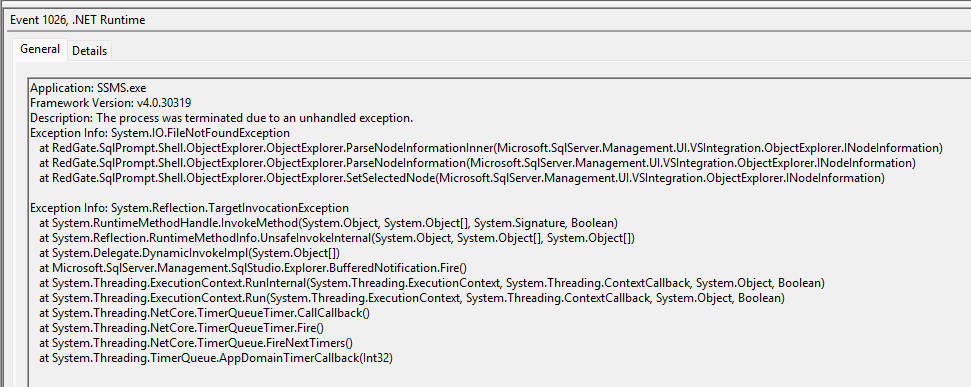
The following error is captured in the Windows Event Log when SSMS 22 crashes
Application: SSMS.exe Framework Version: v4.0.30319 Description: The process was terminated due to an unhandled exception. Exception Info: System.IO.FileNotFoundException at RedGate.SqlPrompt.Shell.ObjectExplorer.ObjectExplorer.ParseNodeInformationInner(Microsoft.SqlServer.Management.UI.VSIntegration.ObjectExplorer.INodeInformation) at RedGate.SqlPrompt.Shell.ObjectExplorer.ObjectExplorer.ParseNodeInformation(Microsoft.SqlServer.Management.UI.VSIntegration.ObjectExplorer.INodeInformation) at RedGate.SqlPrompt.Shell.ObjectExplorer.ObjectExplorer.SetSelectedNode(Microsoft.SqlServer.Management.UI.VSIntegration.ObjectExplorer.INodeInformation) Exception Info: System.Reflection.TargetInvocationException at System.RuntimeMethodHandle.InvokeMethod(System.Object, System.Object[], System.Signature, Boolean) at System.Reflection.RuntimeMethodInfo.UnsafeInvokeInternal(System.Object, System.Object[], System.Object[]) at System.Delegate.DynamicInvokeImpl(System.Object[]) at Microsoft.SqlServer.Management.SqlStudio.Explorer.BufferedNotification.Fire() at System.Threading.ExecutionContext.RunInternal(System.Threading.ExecutionContext, System.Threading.ContextCallback, System.Object, Boolean) at System.Threading.ExecutionContext.Run(System.Threading.ExecutionContext, System.Threading.ContextCallback, System.Object, Boolean) at System.Threading.NetCore.TimerQueueTimer.CallCallback() at System.Threading.NetCore.TimerQueueTimer.Fire() at System.Threading.NetCore.TimerQueue.FireNextTimers() at System.Threading.TimerQueue.AppDomainTimerCallback(Int32) -

I can get 22.3 to work by:
- running as administrator
- not connecting to the Object Explorer to the server.
When it opens, cancel the initial connection. From there, only connect queries to the server.
It's a half-rate workaround, but it's potentially helpful for the moment. -

Same here, I am getting this error
-

I have the same issue as everyone else. While troubleshooting I came across this thread that reiterates that Microsoft updated the Microsoft.Data.SqlClient library that SSMS v22.3.0 now uses:
https://www.sqlservercentral.com/forums/topic/ssms-22-latest-update-crashing
I also sent some troubleshooting info to Claude (Anthropic) and it came back with:
--------------
The Real Problem:SSMS v22.3.0 upgraded its internal Microsoft.Data.SqlClient assemblies to a newer version. Your Redgate SQL Toolbelt extension was compiled against the old assembly versions, so when Object Explorer loads (which triggers extension initialization), the extension can't find the assemblies it expects → crash.
The "ClientRights" error is likely a red herring - it's just the last thing in the call stack before the assembly binding failure causes everything to unwind.
Solutions (in order of preference):
1. Wait for Redgate to release a compatible update
- Check Redgate's website/support for a v22.3-compatible SQL Toolbelt update
- You mentioned you already updated Thursday, but there may be a newer hotfix by now
2. Disable the Redgate extension temporarily:
- Tools → Extensions and Updates (or Manage Extensions)
- Disable SQL Toolbelt/SQL Search extensions
- Restart SSMS
- You'll lose the Redgate functionality but SSMS will work
3. Rollback to SSMS v21.x or v22.2:
- Uninstall SSMS 22.3.0
- Install previous version from Microsoft's download archive
- This is the fastest way to get back to full functionality with Redgate
---------
I'm going to just use SSMS v20.2 (which I still have on my SQL jump box) until Redgate recompile/release an update for SQL Toolbelt that is compatible with the newer version of Microsoft.Data.SqlClient. I'm sure Redgate are already working on that.
-

I got hit as well. I found that keeping SSMS but uninstalling then installing the previous version here works:
https://download.red-gate.com/checkforupdates/SQLPrompt/SQLPrompt_11.3.4.20814.exe
-

Rolling back to previous version of SSMS worked for me too.
-

Bo Ngoh Thank you for the 11.3.4-download, I couldn't find it.
My SSMS is still at 22.2.1 but SQL Prompt was broken after upgrading to 11.3.5 with this error (different from everbody else in this topic):
Method not found: 'Microsoft.Extensions.DependencyInjection.IServiceCollection Microsoft.Extensions.DependencyInjection.LoggingServiceCollectionExtensions.AddLogging(Microsoft.Extensions.DependencyInjection.IServiceCollection)'.After downgrading to 11.3.4 it works again. Work to do for Red Gate!
-

I still have SSMS 21 installed as well as SSMS 22. Since SQL Search breaks SSMS 22, is there a way to install SQL Search for SSMS 21 and not 22?
-

They just released an update to fix the issue, version 11.3.6.21421
https://download.red-gate.com/checkforupdates/SQLPrompt/SQLPrompt_11.3.6.21421.exe
"Fixed an incompatibility between SQL Prompt and SSMS 22.3 which caused SSMS to consistently crash when SQL Prompt was installed"
SQL Prompt 11.3 release notes - SQL Prompt 11 - Product Documentation
-
Is there an update for SQL Search too? It also broke SSMS.
-
Last update for SQL Search was Jan 28th, Check this page.
SQL Search 3.9 release notes - SQL Search 3 - Product Documentation -
SSMS 22.3 was released after that….
-

Still crashes with SQL Search installed. I un-installed SQL Search and it runs okay, but Redgate will have to update that as well.
-

I installed 11.3.6.21421 for SQL Prompt and then upgraded SSMS to 22.3 and when I opened it SQL Search is still crashing. I did the suggestion above about NOT connecting the object explorer and that works. However, SQL Prompt is NOT available in the menu, basically like it didn't get loaded.
I upgraded SQL prompt first, and then upgraded SSMS to 22.3.
-

Check the documentation in the Release Notes for the fix: SQL Prompt Compatibility Update for SSMS 22.3 - SQL Prompt 11 - Product Documentation. The below tools are not currently compatible with SSMS 22.3, and need to be uninstalled, as they will still cause SSMS 22.3 crash even with the SQL Prompt fix:
- SQL Dependency Tracker
- SQL Data Generator
- SQL Doc
- SQL Search
- SQL Test
-

I posted this over on sql server central…
After multiple reverts, re-dos and uninstall / re-installs, this is where I'm at.
Uninstalled SQL Prompt, SQL Search, SQL Source Control.
Uninstalled SQL 22.2.0 fully, rebooted. Upgrading/downgrading never fixed underlying problems.
Installed SQL 22.3.0 vanilla. Launched, it worked fine.
Installed SQL Prompt 11.3.6.21421, launched, working fine.
Installed SQL Search 3.9.4.6402, launched, BOMB. Uninstalled SQL Search, launched, all back to being OK. So SQL Search is a no-go for now.
Installed SQL Source Control 8.1.6.23205, launched, working fine.
But, then SQL Prompt was missing from the toolbar. I went into Extensions and unchecked the oddly double entries of SQL Prompt, and it restarted. After SSMS restart, the menu is there again and things are working (so far).
The key overall was to uninstall SSMS completely; doing downgrades and upgrades never fixed the underlying issue. Then, I was able to isolate SQL Search as my particular issue.
-

I also updated SSMS to version 22.3.0 on 2-11-26 and it would no longer load until I uninstalled SQL Prompt 11.3. SSMS would just repeatedly crash.
I had to completely uninstall SSMS and use an older installer to get SSMS 22.1.0. It really sucked because I had a lot of work to get done.
-

After installing the latest update to SQL Prompt (11.3.6), which was supposed to resolve the crashing issue, SSMS 22.3 is still crashing.
I completely uninstalled SQL Prompt and SQL Search, upgraded SSMS to 22.3, and then reinstalled both extensions. When I launched SSMS and connected to my database, it crashed again.
Next, I opened Visual Studio and updated SQL Prompt and SQL Search to the latest available versions. However, after reopening SSMS and connecting to the same database, it crashed once more.
-
**UPDATE**
Turns out, SQL Search is the culprit now. If you also use SQL Search, it will crash SSMS 22.3 … -

Where can I find latest version with the fix? I tried downloading from the download page on My Account - Download latest version, but that version does not fix the problem, SSMS still crashes
-
The have not fixed SQL Search yet. The latest release was prior to SSMS 2.3 release.
-
I am talking about SQL-prompt. The version available on My Account is still the 11.3.5 version, NOT the 11.3.6 version
-

Have you checked here? https://download.red-gate.com/checkforupdates/SQLPrompt
-
Thanks Dani Sardà That worked!
-

I followed the suggestion above by Bjoem. My only difference is that I used a copy of Microsoft.SqlServer.ConnectionInfo.Dll found in the Visual Studio folder path. Copying this file as he suggests into the Redgate folder solves the issue.
Add comment
Please sign in to leave a comment.
I updated SSMS 22 to latest release (10th feb 2026), and now it crashes consistantly if SQL Prompt 11(latest version) is also installed.
I had to remove SQL Prompt to get SSMS 22 to stop crashing.
I have tried to do complete uninstall of both SSMS 22 & SQL prompt 11, but with same result