Comments
8 comments
-
 Official comment
Hello Will BD4 & Jeff,
Sorry to hear you are having continued issues with SQL Prompt, in this case, most of our users have cleared this error, so if you are still crashing after updating to the latest SQL Toolbelt Essential versions, we will need to troubleshoot normally and look at your Logs as well as what Redgate Products you have installed.
I suspect that you might have an errant old Redgate Product installed somewhere that maybe was not updated in Toolbelt Essentials, but let me know what you see. If SSMS is crashing, is there a corresponding event viewer entry?
-

FYI - this is still not working for me when I try and load a server up in the Object Explorer (which is pretty crucial to me and I'm sure everyone else :) )
Spent so much time today excited to get SQL Prompt back in SMSS 22.3 but still no joy. All seems to work OK until I try and connect anything in the Object explorer. Crashes regardless of whether I am connecting as part of SMSS startup or whether I try to connect later.
-

I too have the same issue after installing SQLToolbeltEssentials 3.5.3.3038.
-
Not sure why the official link to SQL prompt above still says my issue is not fixed yet you’re commenting like my issue is a minority? Has the object explorer error been fixed? I can use the tools OK since the last fix but I still cannot use object explorer
-

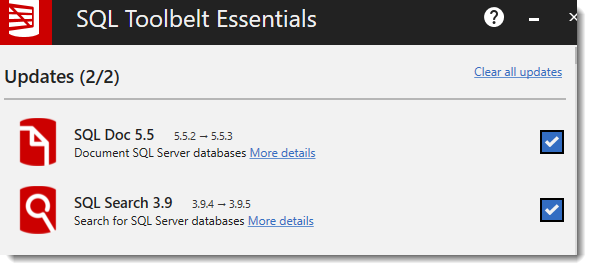
I had the same issue where sql prompt would work in a query window but expanding the databases in the object explorer would crash SSMS. The SQLToolbetEssentials 3.5.3.3038 that is linked in the OP did fix the issue. However, I'm only running SQL Doc and SQL Search on this computer in addition to SQL Prompt.
Here is what I saw from the install page in case it's helpful in any way.
-
OK - so it's working now but not impressed at comms on this.
I originally installed from the link on this post and it was still broken. This is confirmed to be known to be broken in the accompanying links in the post:
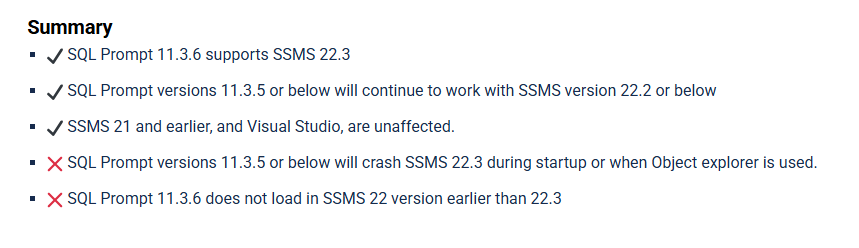
Note for others: the underlying download on the download link changes (but the version number on the exe does not) and the latest version does indeed seem to solve the problem but if you were one of the early downloaders, there are no clues suggesting a fix has actually been made (or even an update).
-
Fixed now for me as well. Same experience in that I downloaded early, checked the file version of the latest download and it didn't change, so I didn't install at that time. But when running the installer from the recent download, it showed that SQL Prompt needed to be updated.
-
Hi Karl, the compatability issues with SSMS 22.3 were not isolated to only SQL Prompt but also impacted SQL Search and I believe Source Control, so when you updated SQL Doc and SQL Search, you likely cleared the compatibility issue for 22.3.
Jeff + Will: Apologies, you are totally correct I should have included a new installer bundle link in my response as those have been getting updated very frequently as a result of what I told Karl above with this defect targeting multiple Redgate Products. That being said, I am glad that both of you are up and running now.
Add comment
Please sign in to leave a comment.
Thank you for your patience, the tools in the SQL Toolbelt Essentials bundle have now all received updates so that they now work with SSMS 22.3.
What happened
SSMS 22.3 introduced changes to internal components used by extensions. Older Versions of the tools depend on earlier version of these components. When loaded in SSMS 22.3, this mismatch causes SSMS to crash during startup or when Object Explorer in SSMS is accessed.
Fix
The latest version on the tools with now work with SSMS 22.3, however they will no longer work with SSMS 22.2 and below. SSMS 21 and earlier, and Visual Studio, are unaffected.
SQL Toolbelt Essentials installer:
https://download.red-gate.com/installers/SQLToolbeltEssentials/2026-02-20/SQLToolbeltEssentials.exe
Important: Other Redgate Tools and SSMS 22.3
The following Redgate products are now compatible with SSMS 22.3
SQL Prompt - Learn More
SQL Doc - Learn More
SQL Dependency Tracker - Learn More
SQL Data Generator - Learn More
SQL Search - Learn More
SQL Test - Learn More