Comments
2 comments
-
 Official comment
Hi Davraf,
Thanks for reaching out to Redgate Support, apologies for the display issue you appear to be experiencing. I am including a screenshot below of what you should be able to do to fix this behavior:
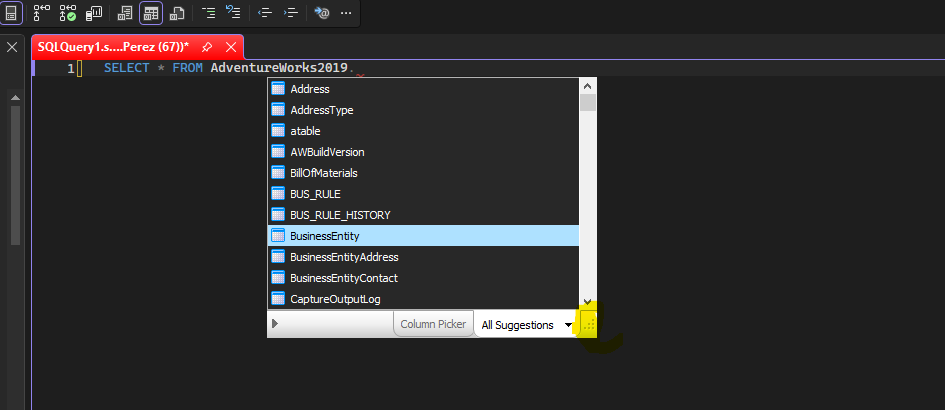
If you click on the 6 dots in the bottom right-hand corner you should be able to re-size the suggestions window. This behavior is generally caused by the resolution of the screen you are working on, so if you can increase the resolution even temporarily, you should get around this behavior.
If you cannot increase resolution or re-size the window, you may have to move your Windows taskbar to the left hand side of the screen, re-size the window, then move the taskbar back to the bottom. Should be as easy as drag and drop the toolbar. (might have to unlock it)
Can you give the above steps a shot and let me know what the results are?
-

That workaround with moving the taskbar actually makes sense if the suggestions window is opening below the visible desktop area through RDP. Windows scaling and remote desktop resolutions tend to cause a lot of weird UI issues like this. @geometry dash
Add comment
Please sign in to leave a comment.
The list of suggestions is hidden under the Windows menu.
I use a Windows 11 PC that I access with RDP.
sql prompt 11.3.11.23448