Comments
13 comments
-
 Official comment
Why this has been happening
Due to some architectural changes to SSMS that were introduced from the v21 release onwards, we've seen a significantly higher volume of dependency changes than ever before. Because our tools run as plugins inside SSMS rather than as separate processes, every dependency update means we need to make sure our products still support it. That's made keeping pace with SSMS releases considerably more challenging than it used to be.
What we've already changed, and what's next
We want to be transparent that we've been actively working on this, and a number of improvements are already in place:
- We've changed the default upgrade mechanism so SQL Prompt now updates the whole of SQL Toolbelt Essentials rather than individual products. A lot of the crashes were caused by one TBE product being updated while others weren't, leaving users on a mixed and unsupported set of versions, which matches what some of you found above with old or unused Redgate tools (like SQL Dependency Tracker) causing the crash. This change has meaningfully reduced the frequency of issues.
- We now get early access to SSMS release candidates ahead of the monthly public release, which lets us test and get fixes out before it lands for everyone. This has proven largely reliable, though it doesn't fully eliminate risk since last minute changes can still happen. We'll keep investing in this regression testing.
- We believe the last few SSMS releases haven't required any hotfixes on our side. If your team has kept seeing problems on the latest versions of both SSMS and SQL Toolbelt Essentials, we'd like to know, since it may point to something specific to your environment that we're not aware of.
- We do acknowledge the SSMS 22.6 release caught a library issue in our licensing code, which we're sorry for. That one got through our testing process.
- We're also looking at how to communicate compatibility better ahead of releases, including showing verified compatible SSMS minor versions on our docs site. Not in place yet, but it's something we're committed to.
-

I have this issue as well, ended up uninstalling SQL Prompt and SSMS 22.5, put 22.5 back on and its stable.The issue was SQL Prompt, which I miss dearly at this point.
-

I urge people, if they rely on Red-Gate tools, to not upgrade SSMS to _any_ new release until you see each tool state that it supports the latest SSMS.
I've gone through this so many times - upgrade, then break immediately. I've come to peace with the fact that I value my Red-Gate products working more than the very latest SSMS release, AND that they very rarely do they “just work” even for a minor point release in the SSMS world.
-

Same issue here. Reverting to earlier SSMS fixed it for now.
-

Hi, I confirm the issue. After installing the MS update promomed in SSMS, then Redgate Prompt starts crashing. Similar situation was after every recent MS update of SSMS. It's been pretty frustrating to solve it after every recent SSMS update and I wonder if alternatives (Apex, dbForge,…) are more stable in that sense?
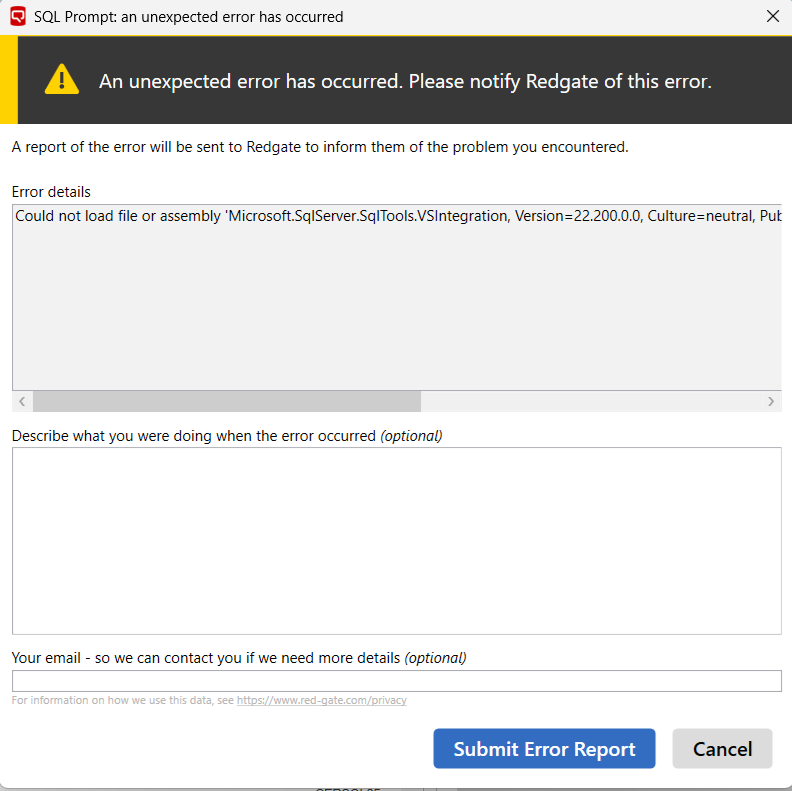
-

After installing all the latest updates this problem seems te be solved.
-

Also with SQL Prompt version 11.3.11.23448, SSMS 22.5 crashes. Had to downgrade to 22.4, then it works again. Very unfortunate.
-

Works well for me now. The issue was not caused by SQL Prompt, but by other Red Gate products I was not using (and also not updating).
https://documentation.red-gate.com/sdg/troubleshooting/common-issues/ssms-22-5-compatibility
Uninstalling them solved the issue and Prompt now works well on 22.5
-
After uninstalling an old version of SQL Dependency Tracker, SSMS 22.5 worked well. Thank you very much.
-

Hello Redgate? When will you get this under control again? Every update of RG tools or SSMS a potential disaster, and we all need to reinstall our client software again and again.
I beg you to make this stuff stable again!
-
After the latest updates, I took the plunge. Downloaded all latest versions of Red-Gate products I use, installed them on the older SSMS 22.4.1.
Then, installed 22.5.x (latest). Opened, tried accessing a database, crash. Crashed every time.Uninstalled -all- Red-Gate products. Then, simply re-installed the same products I had downloaded earlier. on top of 22.5.x. Now 22.5.x is behaving just fine.
-

Same here. SUPER DISAPPOINTED in RedGate. It seems like every new version crashes. Then everyone complains. Then they finally fix it. Why are they not getting ahead of this???
-
Sarah thank you for that explanation, it really helps frame what RedGate is going through and doing in the background. Much appreciated.
Add comment
Please sign in to leave a comment.
After installing SSMS 22.5.0 and connecting to a databaseserver, SSMS crashes. Probably caused by SQL Prompt, because the log contains:
1820 2026-04-15 12:01:42.783 +02:00 [Information] Logging level set to 'Information'
1820 2026-04-15 12:01:43.567 +02:00 [Information] Launching package entry point Ssms22 (version 22.5.11709.299) for SQL Prompt 11.3.10.22862.
1820 2026-04-15 12:01:43.615 +02:00 [Information] Initialising DTE and AddIn connections.
DTE.FullName: C:\Program Files\Microsoft SQL Server Management Studio 22\Release\Common7\IDE\SSMS.exe
DTE.Version: 18.0
DTE.CommandLine:
Current culture: nl-NL
Current UI culture: en-US
1820 2026-04-15 12:01:46.352 +02:00 [Information] SqlPromptApplication initialised (startup took 0:00:00.001)
1820 2026-04-15 12:01:46.967 +02:00 [Information] Current license: Enabled = True, Activated = True, Supported = True, Features = BulkCodeAnalysis, BulkFormatting, CrossProductIntegration, PlatformSnippetSharing, PlatformStyleSharing
1820 2026-04-15 12:01:47.173 +02:00 [Information] Sql History initialized successfully
1820 2026-04-15 12:02:09.316 +02:00 [Error] Check for updates: Failure whilst attempting check for updates
[Outer exception] System.Net.WebException : The operation has timed out
at System.Web.Services.Protocols.WebClientProtocol.GetWebResponse(WebRequest request)
at System.Web.Services.Protocols.HttpWebClientProtocol.GetWebResponse(WebRequest request)
at System.Web.Services.Protocols.SoapHttpClientProtocol.Invoke(String methodName, Object[] parameters)
at RedGate.Update.Client.SoapUpdateServer.Check.CheckForUpdates(String xmlArgument, String& xmlResponse, String& errorMessage)
at RedGate.Update.Client.UpdateServer.UpdateServer.CheckForUpdates(String serialNumber, Boolean automatic)
1820 2026-04-15 12:02:09.348 +02:00 [Error] Check for updates: Facade failure
[Outer exception] System.Net.WebException : The operation has timed out
Server stack trace:
at System.Web.Services.Protocols.WebClientProtocol.GetWebResponse(WebRequest request)
at System.Web.Services.Protocols.HttpWebClientProtocol.GetWebResponse(WebRequest request)
at System.Web.Services.Protocols.SoapHttpClientProtocol.Invoke(String methodName, Object[] parameters)
at RedGate.Update.Client.SoapUpdateServer.Check.CheckForUpdates(String xmlArgument, String& xmlResponse, String& errorMessage)
at RedGate.Update.Client.UpdateServer.UpdateServer.CheckForUpdates(String serialNumber, Boolean automatic)
at RedGate.Update.Client.UpdateService.CheckForUpdatesStatic(IUpdateServer updateServer, IDownloadManager downloadManager, String serialNumber, Boolean automatic, DownloadProgress progress)
at System.Runtime.Remoting.Messaging.StackBuilderSink._PrivateProcessMessage(IntPtr md, Object[] args, Object server, Object[]& outArgs)
at System.Runtime.Remoting.Messaging.StackBuilderSink.AsyncProcessMessage(IMessage msg, IMessageSink replySink)
Exception rethrown at [0]:
at System.Runtime.Remoting.Proxies.RealProxy.EndInvokeHelper(Message reqMsg, Boolean bProxyCase)
at System.Runtime.Remoting.Proxies.RemotingProxy.Invoke(Object NotUsed, MessageData& msgData)
at RedGate.Update.Client.UpdateService.Callback.EndInvoke(IAsyncResult result)
at RedGate.Update.Client.UpdateFacade.CheckFinished(IAsyncResult ar)