Comments
41 comments
-

SSMS 22.4 is constantly crashing for me--even with latest SQL prompt. I am going to uninstall and go back to 22.3.3 SSMS and hopefully back 1 version on SQL prompt as all was working before the update.
-

Working for me as well. Thank you!
-

working for me too - looks like that was a quick fix. I tried an earlier version 11.3.6 as recommended by RedGate support - that doesn't work.
mike.hodgson nice detailed explanation of whats happening.
-

Heino Zunzer the fix applies specifically to SQL Prompt, as it was the only tool affected.
Curtis, the correct sequence is to uninstall your Redgate tools, upgrade SSMS, and then reinstall the tools. This is the recommended workflow whenever upgrading SSMS.
-

Morning, having issues still. Have updated SSMS to 22.4.1 and have subsequently installed the latest Toolbelt 3.5.3.3038. No SQL History or SQL Prompt visible in the SSMS UI.
I am able to use SSMS 21 where SQL History / Prompt are still present. -
Hi Michael Sim
Please can you follow the steps in this article:
-
I don't have anything in the extensions menu (that's after upgrading SSMS 22 using the installer and uninstalling and installing new SQL toolbelt.
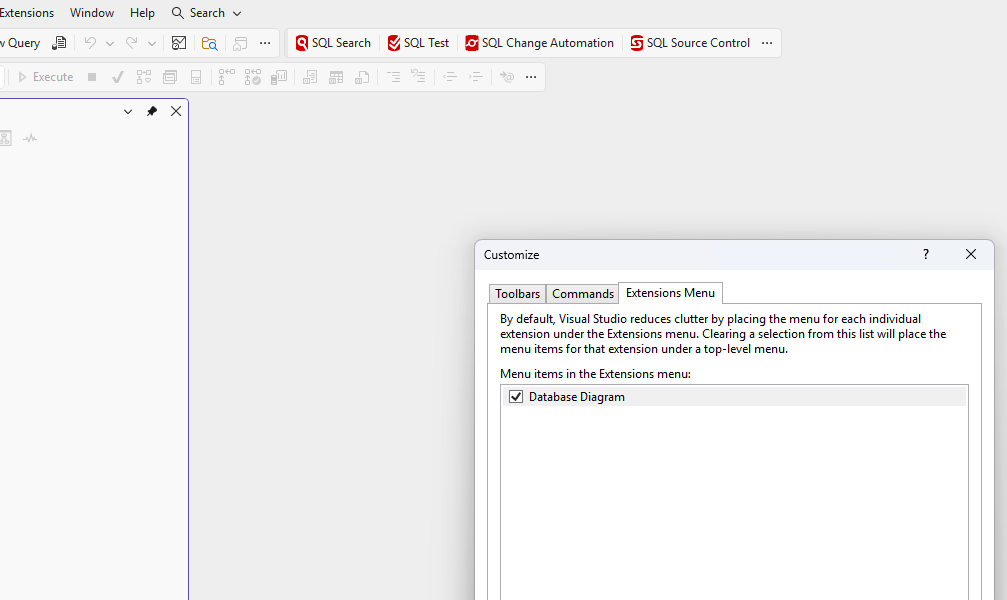
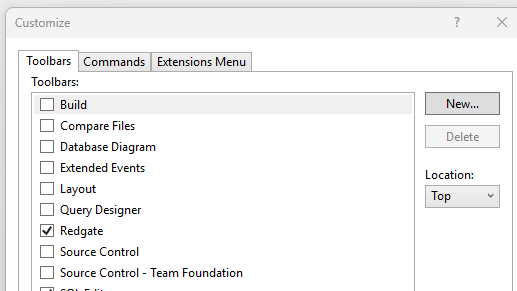
-
Michael Sim I had to uninstall the entire redgate tool belt and then reinstall to get SQL Prompt to work with SSMS 24.2. Give that a try.
-

I upgraded to SSMS 22.6 today. Both my old version of SQL Prompt (not sure which it was) and the new version, 11.3 throws this error:
Initialization of 'RedGate.SqlPrompt.Wpf.SqlEditor.SqlTextEditor' threw an exception.
This happens as soon as I open SSMS and connect to a database. The entire extension is unusable. When I roll SSMS back to 22.3, it works fine again. -
I just ran the latest SQL Prompt upgrade and it seems to work fine on SSMS 22.6.0. Version 11.3.13.23933.
-
Thanks Phil M. I can confirm having 22.6.0 and 11.3.13.23933 is working for me today post a reinstall.
Add comment
Please sign in to leave a comment.
After upgrading to SSMS 22.4.1, SQL Failed to work. Getting error message when opening SSMS. SQL prompt menu is available but zero functionality.