Comments
2 comments
-
 Official comment
Hi Bob,
Hope you are doing well today, thanks for reaching out to Redgate Support regarding your question on loading SSMS without any Redgate Extensions being present. To answer your question, there is not a direct way to run two SSMS instances with only opne loading Redgate extension as SSMS loads all installed extensions per user profile at startup.
That being said, you might be able to achive this by using a workaround, if you attempt to load SSMS in Safe Mode, that should load SSMS without any add-ons including SQL Prompt. If you open a normal SSMS instance and then for the second instance open a Command Prompt window and run “ssms.exe -safemode” that should open another SSMS instance without any addons as it will be in safe mode.
Give the above a shot and let me know if you run into further issues or if that is a functional workaround.
-

The -safemode option is not a real option in SSMS 20 or a few older versions that I've tried.
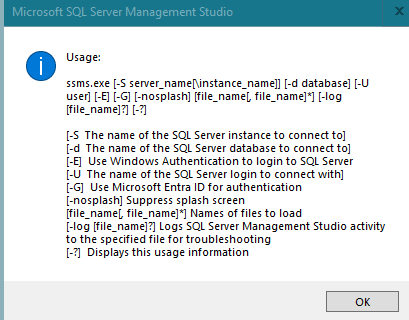
The current work around for me. I normally use SSMS 20, so I installed SSMS 22 and blocked the redgate addins. Now I still use SSMS 20 for on prem and SSMS 22 for azure sql.
Thanks.
Add comment
Please sign in to leave a comment.
Is there a way to have multiple ssms apps open and 1 of them without the redgate extensions loaded ?