Comments
10 comments
-

Yes, I was about to post that. Redgate is not up to the mark in releasing support for the new SSMS 22 version. Little disappoint on this.
-

Same here, SQL prompt is gone in SSMS22. Very disappointed…. Updates are never smooth with this product.
-

Came here for this. Been having problems with sql prompt on 21 and 22. Getting really frustrated about this.
-

SQL Prompt 11.3.3.20567 but it still does not show in SSMS 22. Has anyone found a fix?
Redgate support does not respond. How do you contact their support?
-

Same issue here. Please fix!
-

Help me if you can I fell 'n down !
It's 2026. Same result, 20 years of desktop support, can not make it run, on 3 machines. One guy told me that MS does in intentionally with each version, so red gate gave up with their support.
Hey support please help us !!! -
going back to SSMS 2019.
-
Just got message from RG<, keywords “Uninstall and reinstall ..Uninstall and reinstall ”
----------------
Close SSMS 22.- Reinstall SQL Prompt.
If SQL Prompt still does not appear:
- Uninstall and reinstall SQL Prompt again, or
-
Navigate to the SSMS 22 executable directory and run the following command in Command Line:
start /wait "" "./SSMS.exe" /updateconfigurationWait for the command to complete, then reopen SSMS 22.
These knowledge base articles supported the information provided in my response: - SSMS 22 freezes while importing SQL Prompt settings for the first time
- Trouble loading SQL Prompt in SSMS v22 after upgrading to v11.2.1 or later - SQL Prompt 11 - Product Documentation
- SSMS 22 freezes while importing settings for the first time - SQL Prompt 11 - Product Documentation
-
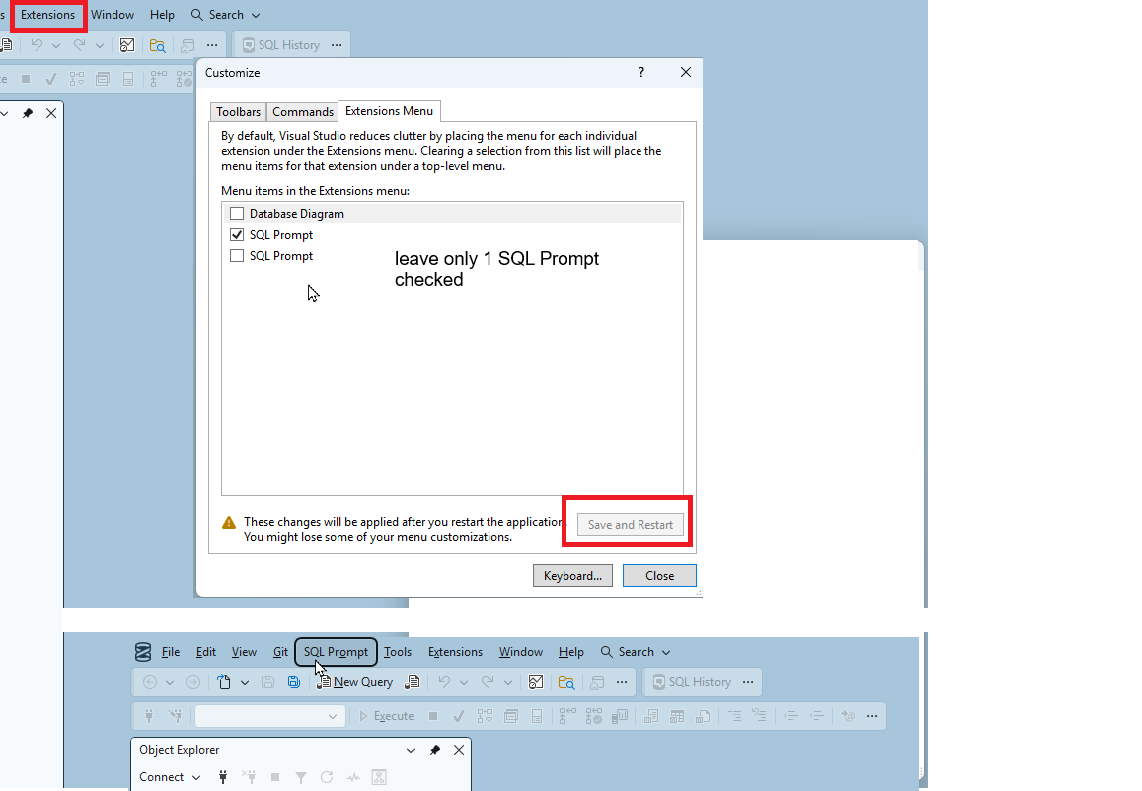
Looks like it worked, after that command , I restarted extension menu, leaving only 1 SQL Prompt
-
Saw SQL Prompt on the top menu, and then after restart it went away.-??? I quit.
Add comment
Please sign in to leave a comment.
Did anybody else lose SQL Prompt and History from SSMS 22 after the latest update? I updated to 11.3.2.20417 and now Prompt and History are gone from SSMS 22. I can still use them both from SSMS 21.