Comments
11 comments
-
 Official comment
We’re actively working on supporting SSMS 22 for full compatibility with our SSMS add-on tools - SQL Prompt, SQL Change Automation, SQL Source Control, SQL Search and SQL Test.
We're in final testing phase and we’re hoping to release very soon.
I'll repost once we have a release.
-
SQL Search now supports SSMS 22. Here's the latest installer:
https://download.red-gate.com/checkforupdates/SQLSearch/SQLSearch_3.9.0.6266.exe
-

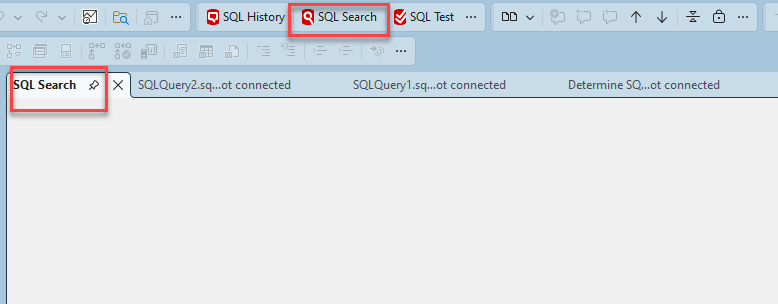
I just installed SSMS 22 and then installed the 3.9.0.6266 version of SQL Search. Just shows a blank screen. Any suggestions?
-
Hi dan.glenn
We have had some recent reports of issues in SQL Search due to a bug in SQL Prompt v11.2.1
Can I start by checking if you have SQL Prompt installed on this machine? If so, can you please update both SQL Prompt and SQL Search to the latest versions to see if this resolves this issue.
Download links for both tools available here:
https://download.red-gate.com/checkforupdates/SQLSearch/SQLSearch_3.9.2.6322.exe
https://download.red-gate.com/checkforupdates/SQLPrompt/SQLPrompt_11.2.2.20219.exe
Can you also check for any recent logs and share them from here:C:\Users\<user>\AppData\Local\Red Gate\Logs\SQLSearch 3
It may be worth doing a complete uninstall and check that this folderC:\Program Files (x86)\Red Gate\SQL Searchis fully removed. There may be a corrupted file that isn't being replaced as part of an update install and clearing out the folder could help resolve this. -

I'm also getting the same results (blank screen) as dan.glenn even after trying your suggestions.
There is an unhandled exception in the recent SQLSearch logs:
2026-01-07 10:32:11.785 -05:00 [Error] [RedGate.SQSearch.Addin.Utils]: Unhandled exception
System.MissingMethodException: Method not found: 'Void RedGate.Update.Client.WinForms.UpdatesControl.Initialize(System.String, System.Version, RedGate.Update.Client.Interfaces.IUpdateLogger)'.
at RedGate.SQLSearch.Addin.Tab.Controls.SearchTab.<>c__DisplayClass4_0.<.ctor>b__0()
at RedGate.SQLSearch.Addin.Utils.ErrorDialog.DoWithErrorHandling(ILog log, IWin32Window parentWindow, InvokerDelegate`1 toDo, EventArgs args)
-

I'm also having the same issue on both SSMS 21 and 22.
It occurs on latest sql toolbelt versions as of 05.01.2026. This includes SQL Prompt 11.3.2.20417 and Sql Search 3.9.3.6351 .
I'm seeing a similar log:
2026-01-07 16:39:24.610 +01:00 [Error] [RedGate.SQSearch.Addin.Utils]: Unhandled exception
System.MissingMethodException: Method not found: 'Void RedGate.Update.Client.WinForms.UpdatesControl.Initialize(System.String, System.Version, RedGate.Update.Client.Interfaces.IUpdateLogger)'.
at RedGate.SQLSearch.Addin.Tab.Controls.SearchTab.<>c__DisplayClass4_0.<.ctor>b__0()
at RedGate.SQLSearch.Addin.Utils.ErrorDialog.DoWithErrorHandling(ILog log, IWin32Window parentWindow, InvokerDelegate`1 toDo, EventArgs args)
File versions: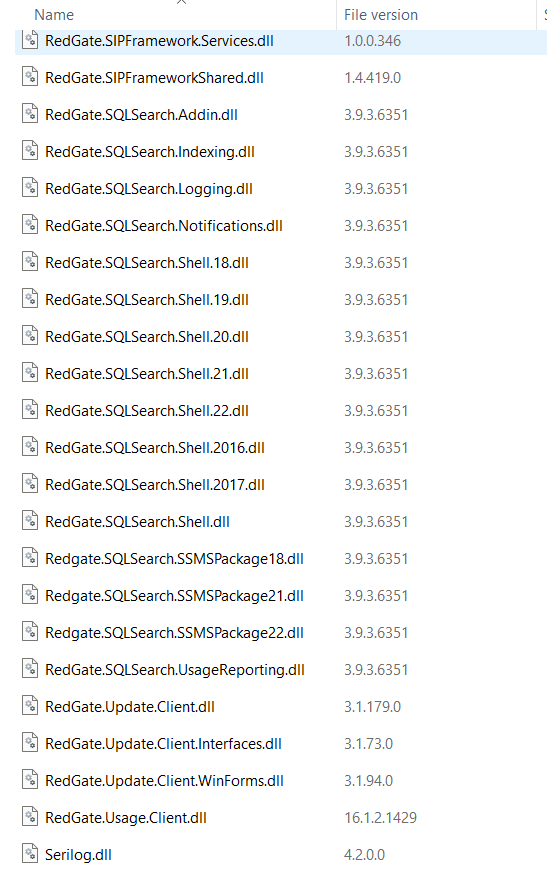
-
Hi
After testing, we were able to replicate the issue. Having SQL Change Automation installed will break SQL Search.
This has been escalated to the developers for further investigation. If you don't use SQL Change Automation, uninstalling it should resolve the issue.
If you do use SQL Change Automation, hold tight as we'retesting for a workaround while the issue is being worked on. -
Yes. Uninstalling SQL Change Automation resolved our issue with SQL Search. In our case we are not currently using this tool so it works for us for now. Thank you.
-

Hi
I seem to be having the same issue (Blank screen in SSMS 22), different error:
[RedGate.SQSearch.Addin.Utils]: Unhandled exception
System.MissingMethodException: Method not found: 'Void RedGate.SIPFramework.Services.ServicesToPlugins.SsmsFunctionalityProvider..ctor(EnvDTE80.DTE2)'.
at RedGate.SQLSearch.Addin.Tab.Controls.SearchTab.AddContextMenuButtons(Controller controller)
at RedGate.SQLSearch.Addin.Utils.ErrorDialog.DoWithErrorHandling(ILog log, IWin32Window parentWindow, InvokerDelegate`1 toDo, EventArgs args)I have SSMS 21 and 22 installed side by side, and have uninstalled/reinstalled and run the command prompt suggestion with no luck.
Edit: Just to add, SQL Search works in SSMS 21 but not in SSMS 22.
Edit 2: I also don't have SQL Change Automation installed. -

Thanks. Uninstalling SQL Change Automation resolved my issue as well.
-
Hi Adam
Please can you uninstall and reinstall SSMS 22, then uninstall and reinstall SQL Search.
Add comment
Please sign in to leave a comment.
I can't live without SQL Search, but I want to use SSMS22…just wondering if there's a roadmap for when it will be available for the newest SSMS?