Comments
13 comments
-
 Official comment
Hi @Jamie,
Thank you for reaching out on the Redgate forums regarding your SQL Prompt install question.
When installing SQL Prompt via SSMS or the Redgate website installer, you'll often be offered the SQL Toolbelt Essentials bundle installer rather than a SQL Prompt-specific package.
This is by design as the bundle installer lets you install multiple Redgate tools in a single pass, which is useful if you have licences for several products.
The key point to that is you don't need a SQL Toolbelt Essentials licence to use it. During installation, you can select only the products you're licenced for, such as SQL Prompt, and the installer will proceed accordingly. Licensing is checked when a product is run, not at a point of installation.
If you'd prefer a standalone SQL Prompt installer, you can download it directly from: https://download.red-gate.com/checkforupdates/SQLPrompt
This will give you the SQL Prompt-specific executable (e.g.
SQLPrompt_11.3.14.24187.exe) without going through the bundle. -

The toolbelt installer won't allow the update from 11.3.13 to 11.3.14, it prompts every day and every day it says it can't install because that version is already installed.
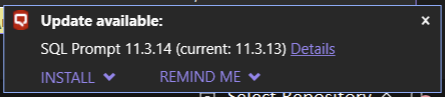
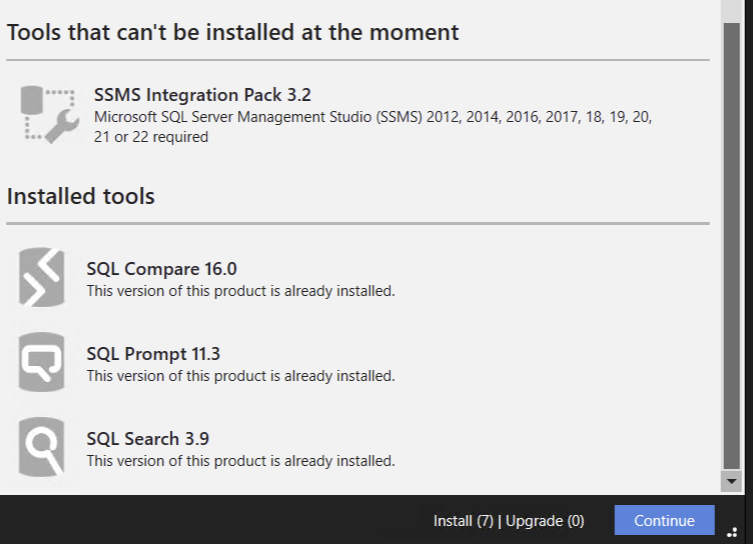
-

Why have you started linking to the Toolbelt in the SQL Prompt Release Notes, seems odd:
https://documentation.red-gate.com/sp/release-notes-and-other-versions/sql-prompt-11-3-release-notes -

Hi Mike,
I got the same behavior when attempting to update directly from SSMS. I've let our internal team know about this. Please use this link to download the individual installer directly: https://download.red-gate.com/checkforupdates/SQLPrompt/
-
Hi Chris,
We've linked the Toolbelt installer so that in the case a customer uses multiple tools, everything is updated at once. We've seen cases where a mix of up-to-date and out-of-date causes issues within SSMS, so this will make sure everything is up-to-date.
-

Hi, this issue is still happening on 11.3.15. It offers to install upgraded for SQL Prompt with version 11.3.15. If we choose no optional add-ons, the installer says “nothing to upgrade”. So, we selected the opotional add-on to make this message go away; however - even after doing that SQL prompt is still on 11.3.13 and we continue to keep getting the first prompt again…
This happened to us for upgrades to 11.3.14 and continues to prompt us to upgrade everyday even with 11.3.15 but doesn't really upgrade.
Thanks
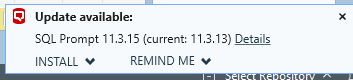
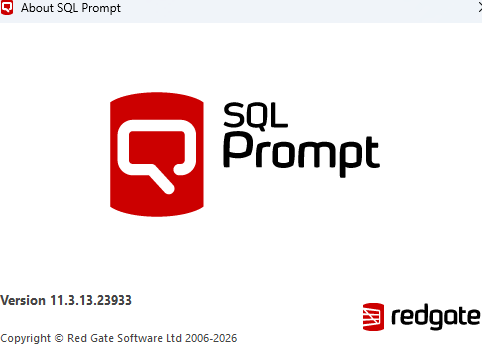
-

Having the same problem as above, being told there's an update for SQL Prompt to 11.3.15 from 11.3.13 but then being told there's no new versions to update to.
-
Same here, still broken trying to update from 11.3.13 to 11.3.15.
-
Hi everyone,
Can you please try the following?
- Close SSMS.
- Navigate to the folder: C:\Users\<username>\AppData\Local\Temp\RedGate\CFU
- Delete the SQLToolbeltEssentials.exe file.
- Reopen SSMS.
- Run Check for Updates again and retry the installation.
Please let me know how this works.
-
Doing the above caused SQL Toolbelt Essentials to suggest 10 updates which have gone through and all seems good so far.
-
That worked for me as well. Now, if we could just get SQL Search to work on ARM. :)
-

I'm still having an issue with SQL Prompt fail
SQL Toolbelt Essentials failed with exit code 0x0000005 -

Hello,
Getting SQL Prompt through the Toolbelt Essentials installer is pretty convenient since it bundles useful tools in one setup. It saves time and keeps everything organized for developers. That kind of simplicity matters everywhere
Add comment
Please sign in to leave a comment.
When attempting to install SQL Prompt version 11.3.14 from within SSMS 22.6 or download directly from Redgate website, the downloaded installer is SQL Toolbelt Essentials, which I am not licenced for.
This appears to be an error. The workaround I am using is to go directly to the downloads section of the Redgate website and obtain the SQL Prompt installer from there (i.e. SQLPrompt_11.3.14.24187.exe).