How can we help you today? How can we help you today?

How is a schema created and used?

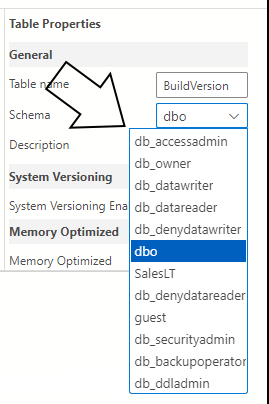
I had thought that a database schema was the name of the structure on which tables are interconnected by primary keys and foreign keys.  But in the tool, Azure Data Studio, the user is asked to select from a pre-defined set of schemas when creating a table.  What is more is that when setting up or createing a database through Azure, we are given the opportuniityh to use a sample database and this is where "SalesLT" comes from and so there must be some place where we can define a schema with Azure Data Studio.  Where would that be?  It was generated when deciding to use a demo sample database.  So there must be some way, using SQL code or otherwise, to generate a schema.

Xarzu
0

Comments

4 comments

  • JoshH
    Hello, 

    This appears to be a more generic database behavior question than one related to Redgate products. I would suggest posting it somewhere like StackOverflow. You might find a more relevant answer there.
    JoshH
    0
  • kanelime
    It seems like this isn't about Redgate products at all, but rather general database behavior. I propose you submit it to a site like StackOverflow. That could lead you to a better answer. 
    io games 
    kanelime
    -1
  • Finley Pearce

    That’s a great question! I remember being confused the first time I worked with schemas in Azure Data Studio too. I realized that a schema is more like a namespace to organize tables, not just their relationships. Creating custom schemas can be done through SQL code as well. Basketball Stars

    Finley Pearce
    -1
  • jimijan

    A database schema in systems like SQL Server (and tools such as Azure Data Studio) is not just the “structure of tables and relationships” in a general sense, but actually a named container (namespace) inside a database that holds database objects like tables, views, and stored procedures. That’s why when you create a table in Azure Data Studio, you are asked to choose a schema such as dbo, SalesLT, etc. These schemas already exist inside the database. For example, SalesLT comes from the sample AdventureWorksLT database, where Microsoft pre-created schemas and tables for demo purposes. So you are not “creating a schema” at that moment—you are simply selecting which existing schema the table should belong to.

    If you want to create your own schema, you can do it using SQL with a simple command like CREATE SCHEMA YourSchemaName; inside your database. Once created, you can assign tables to it or organize objects under it for better structure and security. In Azure SQL or SQL Server, schemas are created inside the database itself, not in Azure Data Studio as a separate place—they are managed through SQL queries or database design tools. If you're working with tutorials or modified app-related guides, you can also explore practical examples here for better understanding: Modwink APK PC Guide

    jimijan
    -1

Add comment

Please sign in to leave a comment.